Select From File Tool
Use the
Select From File tool to reduce the size of a segment by selecting records via a query from an external imported file.
For example:
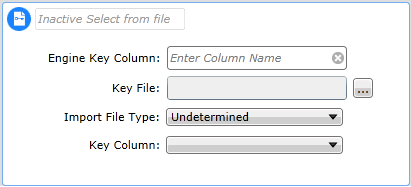
Procedure
To configure the Select From File tool:
- Click into the Engine Key Column field and using the generic selector, browse to the Engine database column that will be queried against by values in the associated file.
- Click the [...] button next to the Key File field to launch the
Document Explorer, from which you can browse to and select the required file or alternatively, click
Upload Files to import a new one.
Note that the key file should not contain column headers.
The system scans the selected key file to determine the file's type and key column. These values are then automatically populated in the
Import File Type and
Key Column fields. If you subsequently change the Key File, you can click the
Rescan file button to perform another scan to determine the values relevant to the new key file.
- Make sure the correct Import File Type field is configured with the appropriate value. If not, use the drop-down menu to manually select the type from the options available: Delimited, Fixed, Undetermined, Excel. Depending on the file type, you might be required to configure additional fields. For example, for Delimited file types, you can specify a Delimiter and Qualifier.
- Make sure the correct value is configured in the
KeyColumn
field. If not, select the required setting from any available in the
Key Column drop-down menu.
- Click
Run Processes to perform the calculation.
| Note: |
- You must only configure this field when there are multiple distinct columns in the selected key file.
Depending on this field's setting you might need to specify the column ordinal, as illustrated in the example in step 3.
-
Support lists in xlsx and csv formats.
- List must first be loaded to the Document Store.
-
Query support for TEXT, UNICODE, INTEGER, REAL with "Equal to" operators with Include and Exclude row logic.
-
View allows visual QA of data to be queried but first 10 rows only.
-
List is imported to document are linked by DocumentId and require original document to persists.
-
Save As, Open Copy keep reference to document.
- Tool does not support query against engineered columns.
- Null records in the column being queried may match a blank entry in the file so if required, nulls should be excluded using a separate query row.
|
|
|


